A Primer on Linux Package Management
Linux has a wide variety of package management systems. This article sorts out the relationships among the mainstream Linux package management systems.
- Ryan
- 2 min read


Simply put, the Linux package management system refers to a tool for installing, removing, or updating software on a Linux system. Different Linux distributions package application software in different formats. For example: Debian-based Linux uses *.deb; CentOS uses *.rpm; openSUSE also uses *.rpm. Because of the differences in package formats across Linux distributions, the package management tools also differ.
For the relationships among various Linux distributions, see here.
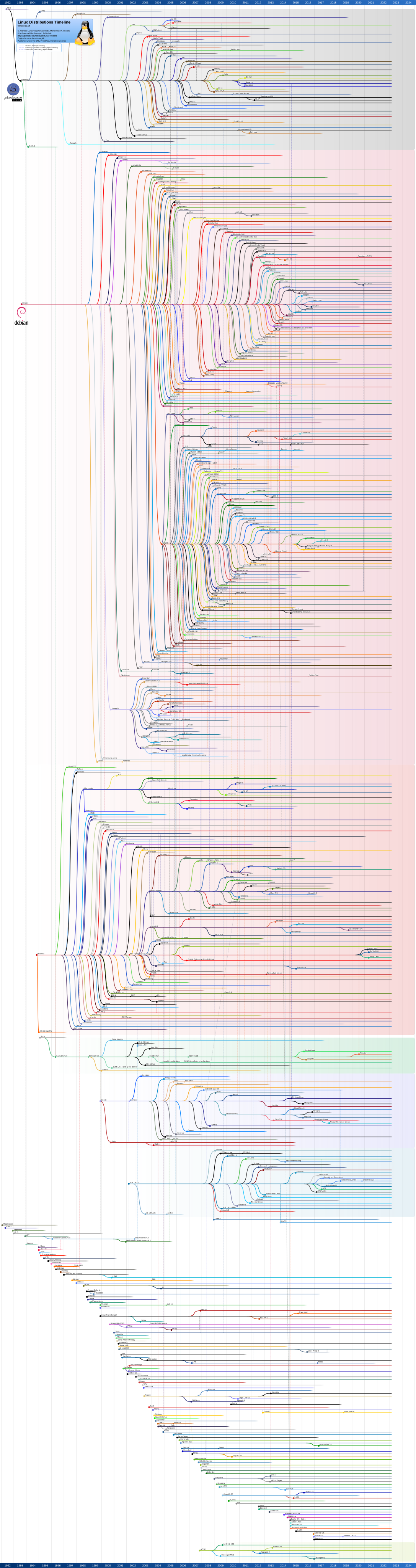
Package management systems can be divided into Lower-Level and High-Level. See the table below:
| Distribution | Lower-Level | High-Level |
|---|---|---|
| Debian-based | dpkg | apt-get/aptitude |
| CentOS | rpm | yum |
| openSUSE | rpm | zypper |
Let’s look at the specific differences between them:
dpkg
dpkg is the low-level package management tool for Debian-based Linux systems. It can install, remove, and build deb-format packages, and can also query detailed information about deb packages. However, dpkg cannot automatically download and install the third-party dependency packages that a software package requires. Usage is as follows:
Install a deb package:
# dpkg -i flashpluginnonfree_2.8.2+squeeze1_i386.deb
List the deb packages installed on the machine:
# dpkg -l
For more usage, refer to: this article.
apt-get
apt-get is the high-level package management tool for Debian-based Linux systems. It provides a convenient set of features such as automatically finding, installing, and removing packages. apt-get can automatically download and install the third-party dependency packages a software package needs. But apt-get differs from dpkg in one way: apt-get cannot directly install deb packages. With apt-get, you just enter the package name and it automatically searches the central repository, downloads, and installs the corresponding package. Usage is as follows:
Install apache:
# apt-get install apache2
For more usage, refer to: this article.
aptitude
aptitude provides similar functionality to apt-get, but aptitude is more intuitive: it provides a graphical interface, so users can perform package management operations very conveniently.

rpm
rpm is the low-level package management tool for Linux Standard Base (LSB)-compatible Linux systems (such as RHEL and CentOS). Overall its functionality is similar to dpkg. Usage is as follows:
Install pidgin:
# rpm -ivh pidgin-2.7.9-5.el6.2.i686.rpm
For more usage, refer to: this article.
yum
yum provides high-level package management on top of rpm, similar in function to apt-get. Usage is as follows:
Install firefox:
# yum install firefox
For more usage, refer to: this article.
In summary, this article is just an introductory primer on the Linux family of package management tools. Most of the content references this article, with the goal of providing a quick reference manual.